Skip to content
Fleur de DC — Floral Boutique Storefront & Content Studio
Back to Portfolio
E-commerce2026Fullstack Engineer

Fleur de DC — Floral Boutique Storefront & Content Studio

An upscale floral boutique storefront paired with a custom content studio, so the owner can manage products, pages and media without touching code.

Next.jsReactTypeScriptMongoDBNextAuthTailwind CSSMinIOPlaywright
Overview

About This Project

Fleur de DC is the online storefront for an upscale floral boutique. Shoppers browse collections, search and filter the catalog, view product variants, save favourites, manage a cart and place demo orders. Behind it, an admin studio at /dashboard/admin runs every product, category, page and image.
Challenge

The Problem

The boutique needed to edit nearly everything — hero banners, stories, testimonials, FAQ and policy pages, SEO and the catalog — without a developer. It also needed flexibility in where images live, and edits by different admins must never silently overwrite each other.
Solution

How We Solved It

I built the storefront and content studio in one Next.js App Router app with Route Handlers over MongoDB, sharing a single repository layer between server-rendered pages and public APIs. Content is edited through structured templates instead of raw HTML, and every save carries a revision number so stale saves return a conflict instead of overwriting newer work. Images can be uploaded with file-signature checks or registered by HTTPS URL, stored on MinIO, Cloudinary or Google Cloud Storage, with private buckets streamed through the app. Admin auth uses NextAuth credentials with scrypt hashes, revocable sessions and an 8-hour absolute expiry, while guest carts and orders use atomic MongoDB updates with idempotent order submission.
Flow

How It Works

  1. 1

    Content-driven storefront

    Every storefront page (home sections, banners, story, testimonials, FAQ, about, contact, header/footer) is server-rendered from MongoDB content records rather than hardcoded copy, so the same data powers both the pages and the public JSON API.

  2. 2

    Browse, filter & search

    Shoppers browse by occasion category or search the catalog with keyword, occasion and sort filters; the /api/products endpoint returns the filtered catalog from published products only.

  3. 3

    Product options, wishlist & cart

    On a product page the shopper picks an arrangement size variant and quantity, then adds it to the bag or wishlist. Cart and wishlist live in a guest session (HttpOnly cookie, 30-day expiry) stored in MongoDB with atomic, revision-checked updates.

  4. 4

    Demo checkout

    Checkout collects sender, recipient and delivery details and creates a demo order: totals are recalculated from stored product prices, and resubmitting the same order UUID returns the same order. No payment gateway or delivery booking is involved.

  5. 5

    Enquiries & newsletter

    Contact messages and newsletter sign-ups are validated and persisted so administrators can review or delete them from the dashboard.

  6. 6

    Admin content studio

    Administrators sign in via NextAuth credentials (scrypt hashes, revocable sessions, 8-hour expiry, rate-limited login) to manage products, variants, categories, page content, assets and demo orders. Image uploads are signature-checked and stored on MinIO, Cloudinary or Google Cloud Storage.

Features

Key Capabilities

💐

Boutique Storefront

Home, shop by category, product detail with variants, search, wishlist, cart and account pages.
🧩

Content Studio

Edit homepage sections, banners, testimonials, about/contact pages, policies, header/footer and SEO.
🏷️

Catalog Management

Create, edit, reorder and publish products and categories with prices, variants and badges.
🖼️

Multi-Provider Assets

Asset library backed by MinIO, Cloudinary or Google Cloud Storage with upload validation.
🔀

Safe Concurrent Editing

Revision checks reject stale saves instead of overwriting another admin's edits.
🔐

Secure Admin Access

NextAuth credentials, CSRF protection, rate-limited login, session revocation and password rotation.
Gallery

Inside the Product

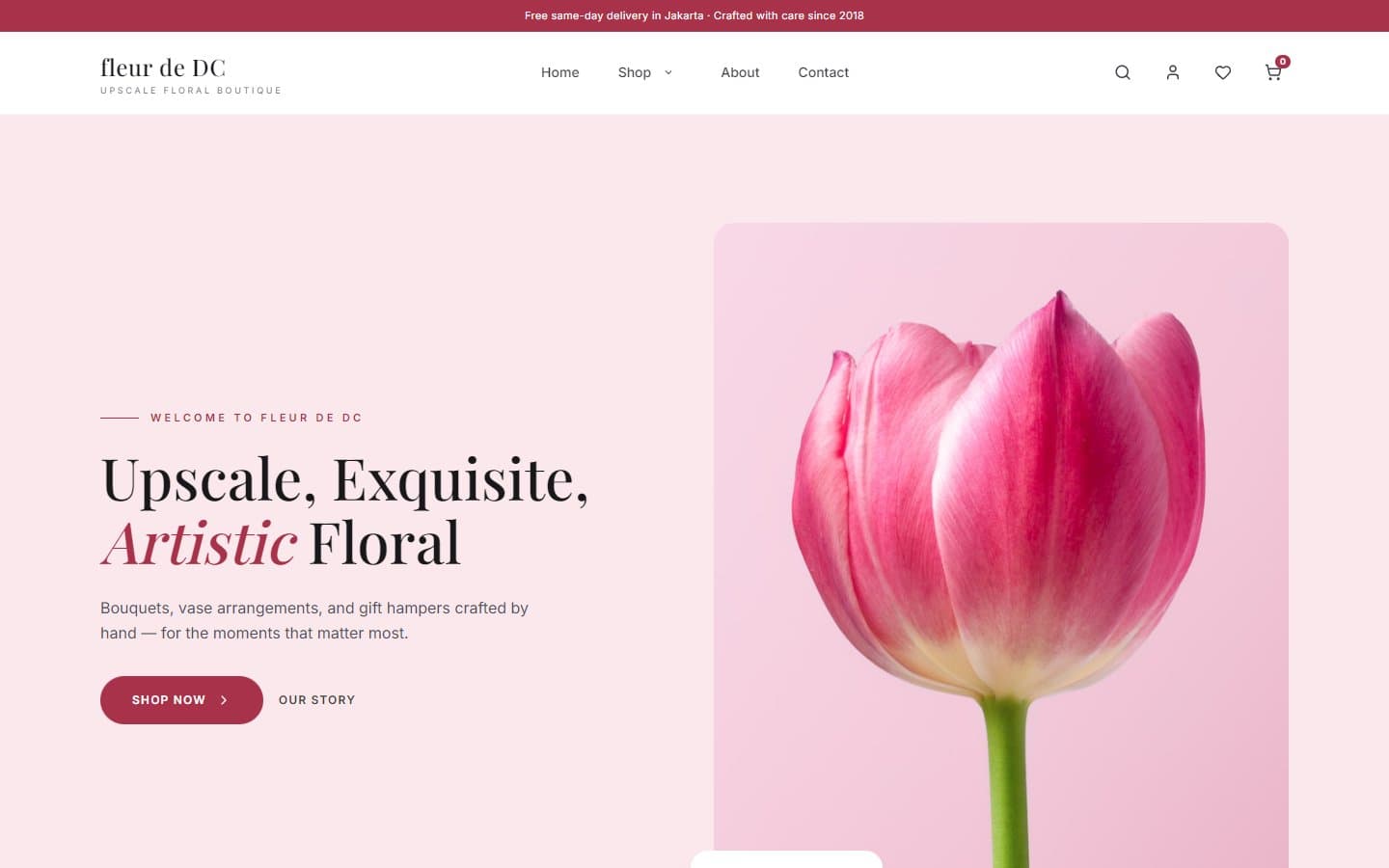
Homepage heroLanding section of the boutique storefront with the announcement bar, navigation, search, wishlist and cart shortcuts. Hero copy and imagery are editable from the admin content studio.
Featured arrangementsTabbed product showcase (New Arrivals, Best Sellers, Valentine's Day) with badges, price ranges for multi-variant items and quick add-to-cart or choose-options actions.
Product detailProduct page where the shopper selects an arrangement size variant and quantity, then adds it to the bag or saves it to the wishlist.
Shop by occasionCategory listing for the Valentine's Day occasion, with keyword search, occasion and sort filters backed by the products API.
Catalog searchSearch results for "box", matching product names across all occasions with a result count and a link back to the full catalog.
Shopping bagGuest-session cart with per-item variant, quantity and remove controls, plus a subtotal summary before continuing to checkout.
Demo checkoutCheckout form for sender, recipient and delivery details next to the order summary. It saves a demo order only; no payment is charged.
WishlistSaved favourites stored in the visitor's guest session, ready to be moved to the cart later.
Contact the floristEnquiry form with topic selection and consent checkbox; submitted messages are stored for administrators to review in the dashboard.
Content studio loginAdmin sign-in for the content studio, authenticated with NextAuth credentials against hashed admin accounts in MongoDB.
Technical

Under the Hood

Application
Next.js 16 App Router with React 19, Tailwind CSS 4 and shadcn/ui; Route Handlers under /api for content, catalog, store, contact and newsletter.
Data
MongoDB native driver with a shared repository layer, Zod validation and an idempotent seed for products, categories, pages and the initial admin.
Storage & Auth
Pluggable storage for MinIO, Cloudinary and GCS; NextAuth credentials with JWT cookies and MongoDB-backed session revocation.
Quality & Delivery
Playwright end-to-end suites for storefront, commerce and admin against an isolated test database; Dockerfile, Jenkins pipeline and Helm values.
Results

Impact & Outcomes

Full owner control over storefront content and catalog without code changes

No lost edits thanks to revision-checked saves

Media decoupled from a single vendor with three interchangeable storage providers

Reflection

What I Learned

A good CMS is defined by its constraints — structured templates, stable slugs and revision checks give owners freedom without letting them break the layout. Building storage behind one interface made switching providers a configuration change.

Other Projects