Skip to content
KGContent — Digital Asset Management
Back to Portfolio
Digital Asset Management2020 – 2023Software Engineer & R&D Core Team

KGContent — Digital Asset Management

Kompas Gramedia's Digital Asset Management platform — one search portal for decades of stories, photos, PDFs and video across the group's publications.

ReactReduxElasticsearchNode.jsBootstrapDockerNginx
Overview

About This Project

KGContent is Kompas Gramedia's Digital Asset Management (DAM) platform — the internal system of record for editorial content and media. As part of the R&D core team I built and maintained it fullstack. The portal lets internal users search across collections such as Harian Kompas, Kompas Text, Kompas.com, Bola, Bola Photo, Kompas Foto, BBJ photos and tabloids, then preview and download the assets they're entitled to.
Challenge

The Problem

Kompas content stretched from the 1990s to today across fragmented sources and formats — article text and XML archives, print-page PDFs, photos and video. Search was slow, much older material still lived in physical form, and access had to be enforced per user, per collection and per action such as viewing details or downloading high-resolution files.
Solution

How We Solved It

I introduced Elasticsearch as the search and indexing layer, consolidated scattered archives behind one API, and supported the effort to digitize physical archives. On the frontend I built a single-page portal with unified and per-type results (all, story, photo, video), advanced filters by publication and collection, sorting, pagination and highlighted search terms. Detail views are tailored per collection — story pages with page-image sliders and PDF download, photo galleries with high-resolution download, and video players — and a permission model fetched at login controls which collections, search options and downloads each user can access.
Flow

How It Works

  1. 1

    Authenticate

    Users sign in on the login page; the token, refresh token and user data are stored in cookies and Redux, and app routes are only rendered after login.

  2. 2

    Start from the library overview

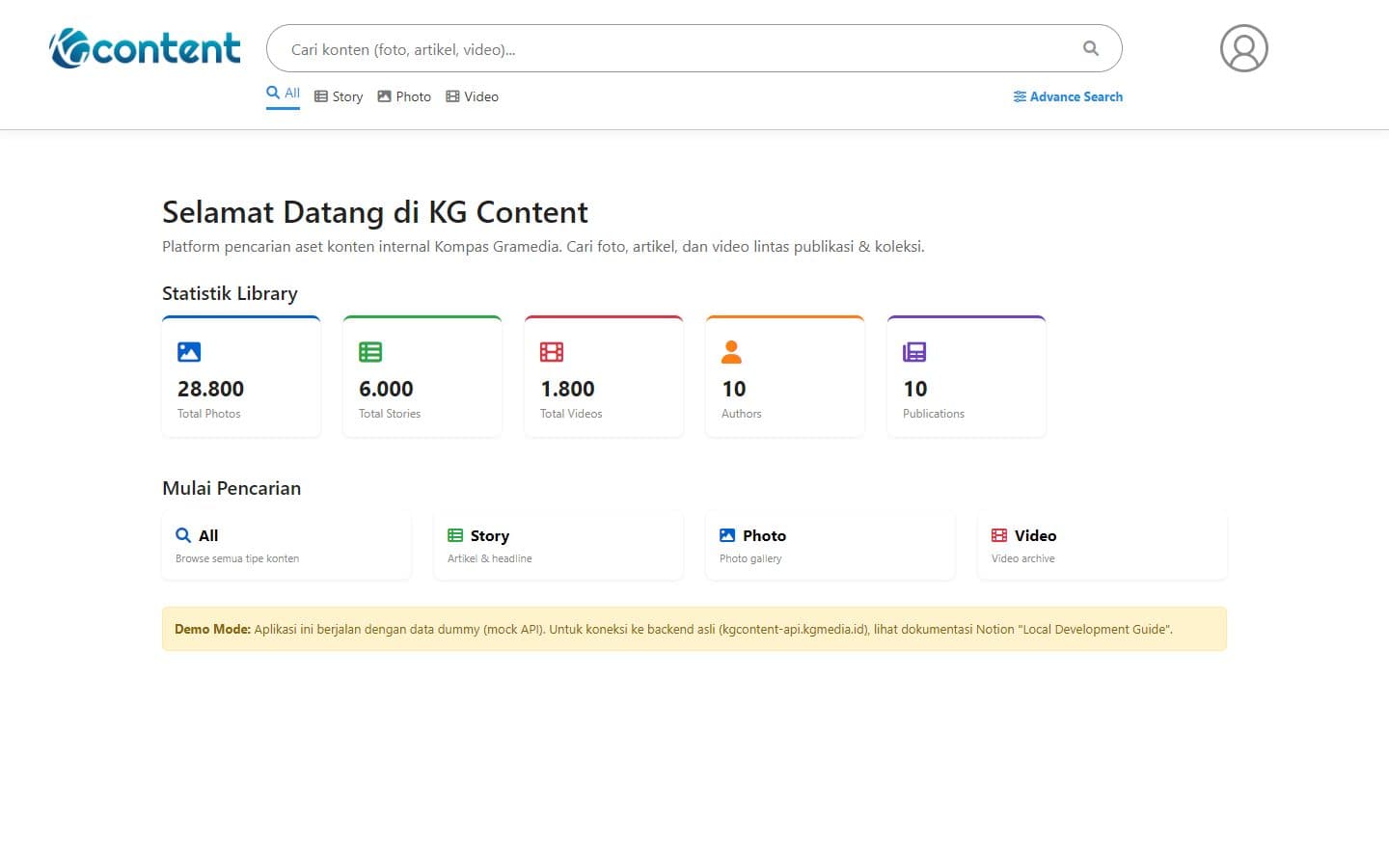
    The home page shows library statistics (photos, stories, videos, authors, publications) and shortcuts into each content type.

  3. 3

    Search across content types

    A global search bar with All, Story, Photo and Video tabs queries the content API; the All tab groups the top results of each type.

  4. 4

    Refine with advanced search

    An advanced panel filters by author, publication, collection and date range, with relevance or ascending/descending sorting and pagination.

  5. 5

    Open an asset

    Detail pages show the photo, article body or video player together with metadata (publication, collection, author, dates) and related assets.

Features

Key Capabilities

🔍

Unified Archive Search

One search across stories, photos and videos from multiple Kompas Gramedia publications.
🎚️

Advanced Filtering

Filter by publication and collection, sort results and page through large result sets.
🗞️

Collection-Specific Views

Tailored detail layouts for Harian Kompas, Kompas.com, Bola, Kompas Foto and BBJ content.
🛡️

Permission-Aware Access

Per-user rights to collections, advanced search, detail pages and downloads.
⬇️

Hi-Res & PDF Downloads

Download high-resolution photos and print-edition PDFs where permitted.
🖼️

Media Previews

Image sliders, page previews and an embedded video player.
Gallery

Inside the Product

Library overviewHome screen with library statistics and quick entry points for All, Story, Photo and Video search (demo build with mock data).
All resultsCombined search view grouping matching photos, stories and videos with per-type counts.
Photo searchPhoto grid with title, publication and date for each asset.
Story searchArticle results with author, publication, date, read time, excerpt and collection tag.
Video searchVideo archive results with thumbnails and durations.
Advanced search filtersAuthor, publication, collection and date-range filters narrowing the video results down to a single match.
Photo detailFull photo view with view and download counts, metadata panel and related assets.
Story detailArticle page with body text, metadata such as publication, collection and read time, and related content.
Video detailVideo player with duration and publication metadata alongside related videos.
LoginProduction login page; the live app is connected to internal Kompas Gramedia APIs.
Technical

Under the Hood

Frontend
React single-page app with Redux for user, search and layout state, React Router, Bootstrap, and XML/XSLT parsing to render legacy archive content.
Search & Data
Elasticsearch for indexing and fast retrieval across consolidated archives, served through the KGContent search, storage and RBAC APIs.
Backend
Node.js services for authentication, per-user permissions, search and download, with assets in object storage.
Infrastructure
Multi-stage Docker build served by unprivileged Nginx, deployed through Jenkins with Helm values.
Results

Impact & Outcomes

Consolidated Kompas archives from the 1990s to today into a single source

Much faster archive search and retrieval through Elasticsearch

Fine-grained, per-collection access to content and downloads

Enabled access to digitized physical archives

Reflection

What I Learned

Working with decades of media showed me how much leverage the right search architecture gives — the archive's value was unlocked by making it findable. Access control mattered just as much: a DAM is only trusted when it shows each user exactly what they're entitled to.

Other Projects