Skip to content
Pemkot Surabaya — SPK Permohonan Siteplan Tata Kota
Back to Portfolio
Government / Decision Support2025 – 2026Fullstack Engineer

Pemkot Surabaya — SPK Permohonan Siteplan Tata Kota

A site plan consultation and permit-processing system for the City of Surabaya, with role-based task assignment, field assistance scheduling and a citizen helpdesk.

Next.jsReactExpress.jsPrismaMySQLCasbinNextAuthMinIO
Overview

About This Project

For the Surabaya city government (Pemkot Surabaya), I built a decision-support and consultation system for site plan applications (permohonan siteplan) within the city's spatial-planning (Tata Kota) process. Citizens apply and track progress online, while coordinators, field officers and helpdesk staff each work from a role-specific dashboard.
Challenge

The Problem

Permit handling involves many hands — applications must be verified, returned for corrections, assigned to the right officer, scheduled for on-site assistance and closed with a clear audit trail. Each officer may only see their own assignments, and administrators need to change access rules without editing users or redeploying.
Solution

How We Solved It

I built an Express 5 API with Prisma over MySQL and a Next.js 16 frontend. Each application carries a file number, document attachments, document verification results, location data down to RT/RW and a JSON status history, moving through Draft, Received, Verified, Returned, In Process, Awaiting Assistance, Completed and Sent. Coordinators assign cases to sub-coordinators, section heads or staff, officers see only their own tasks and schedule on-site assistance sessions, and authorization runs on Casbin (RBAC, ABAC or hybrid with menu-level policies) editable from an admin UI. A citizen-to-helpdesk chat, in-app notifications and email OTP verification round out the workflow.
Flow

How It Works

  1. 1

    Register & verify

    Citizens create an account with username, name, email, phone and password. The API sends a one-time code by email and the account is activated on /verify-otp before the first login.

  2. 2

    Submit a siteplan application

    The applicant fills in parcel data and uploads the required documents, saving it as a DRAFT first. Files are stored in MinIO and served back only through signed or authenticated URLs; submitting moves the application to MASUK and triggers a confirmation email.

  3. 3

    Coordinator triage & assignment

    Coordinators see every incoming application, tick the document verification checklist and assign it to an officer (sub-coordinator, member or section head). Each officer only sees the applications assigned to them under Tugas Saya.

  4. 4

    Processing, revision & field assistance

    Officers move the application through DIVERIFIKASI, DIPROSES and MENUNGGU_ASISTENSI, or return it as DIKEMBALIKAN with notes for revision. They can schedule, reschedule or cancel on-site assistance sessions, and every status change sends an in-app notification and email to the applicant.

  5. 5

    Result & history

    Completed applications are marked SELESAI/TERKIRIM with the official result attached, and appear in the request history for staff and in the applicant's dashboard with real-time status tracking.

  6. 6

    Helpdesk chat

    Applicants open a chat session with the helpdesk; helpdesk staff see all sessions, reply, assign sessions to colleagues and close them, with new messages and notifications polled by the frontend.

  7. 7

    Role-based access control

    Every API route passes JWT authentication and a Casbin RBAC check. The superadmin manages users and role permissions from the Hak Akses screen, and the dashboard menu adapts to the logged-in role.

Features

Key Capabilities

📝

Online Applications

Citizens submit site plan applications with documents and location data and track their status.
✅

Verification & Returns

Staff verify documents and can return incomplete applications to the applicant for revision.
🧑‍💼

Task Assignment

Coordinators assign cases to officers, each of whom works from an isolated My Tasks queue.
🗓️

Assistance Scheduling

Officers schedule and update on-site assistance sessions per application.
🛡️

Casbin Access Control

RBAC, ABAC or hybrid policies plus menu permissions managed from an admin UI.
💬

Helpdesk Chat

Citizens chat with helpdesk staff in sessions that can be opened and closed.
Gallery

Inside the Product

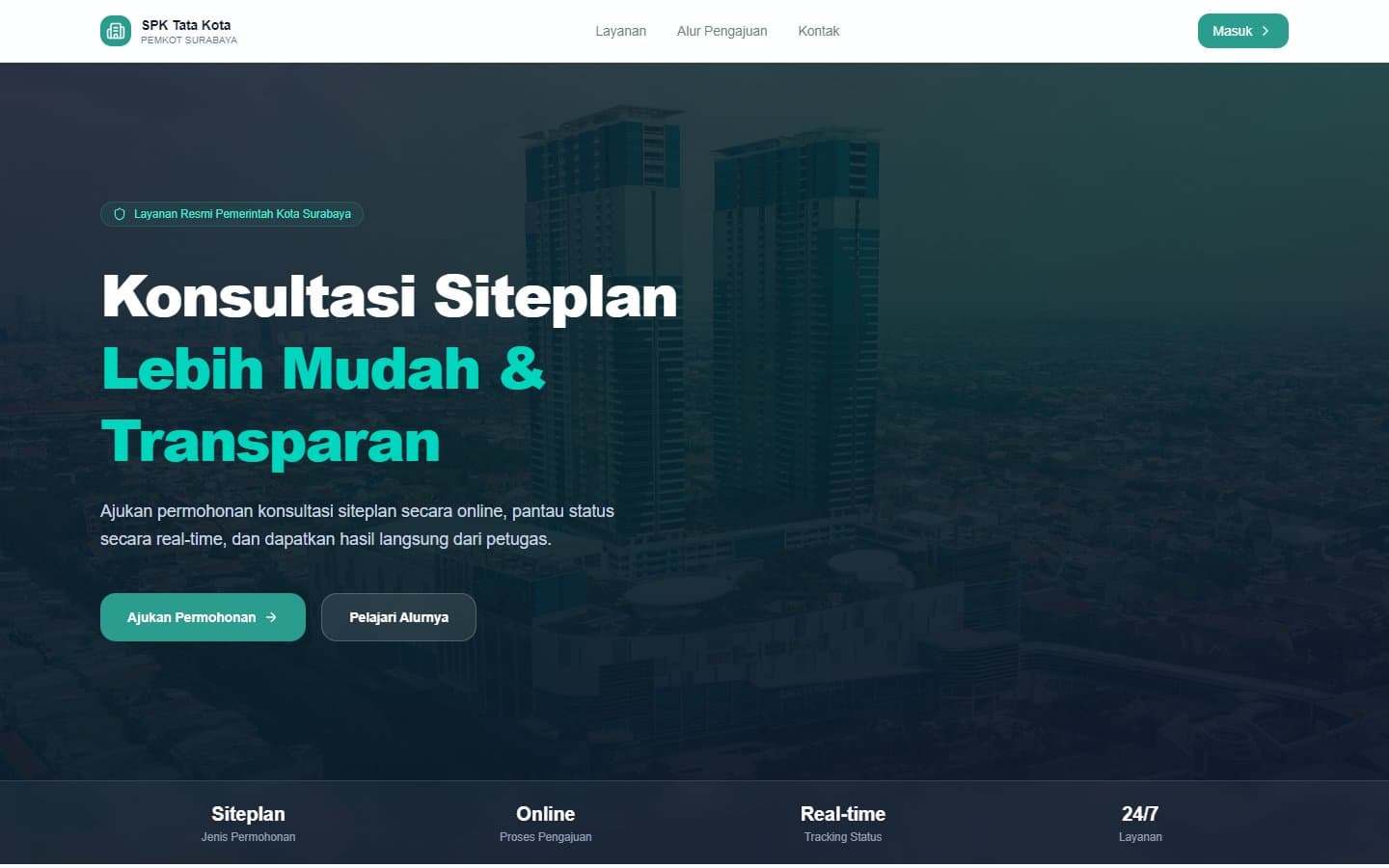
Landing pagePublic entry point of the Surabaya city siteplan consultation service, with calls to action to submit an application or learn the process.
Application workflowStep-by-step timeline explaining the process to citizens: register, submit the form with documents, verification and processing, field assistance, and the official result.
Service overviewSummarises what the platform provides: online submission, real-time status tracking, assistance scheduling and verified results from the officer team.
Citizen registrationAccount sign-up form for applicants; after submitting, the account is confirmed with an email OTP before it can log in.
Unified loginSingle login for citizens and staff; after authentication the user is routed to the citizen dashboard or the role-based admin panel.
Call to action & contactClosing call to action leading to registration, plus navigation and the city office contact details in the footer.
Applicant dashboardCitizen dashboard after login: total applications, a counter per status (submitted, in process, awaiting assistance, completed, returned), the latest applications and a shortcut to start a new one.
Application formStep 1 of the three-step siteplan application: choose New Siteplan or Replanning, flag a proxy applicant, then fill in owner and parcel details; the form can be saved as a draft before submitting.
Coordinator dashboardAdmin overview with totals, a counter per workflow status, applications that still need action and the most recent submissions.
Application managementKelola Permohonan lists every incoming application with type, status, date and assigned officer, with row actions to view the detail, assign or unassign an officer.
Application detailDetail view with application, owner and parcel information and the current status; from here coordinators schedule assistance or mark the application as done. Applicant identity is blurred.
Document verificationRequired and additional documents uploaded by the applicant, each opened from MinIO through a signed link and ticked off on the verification checklist.
Assistance schedule & process historyThe assigned officer with the scheduled on-site assistance session, followed by the full process timeline from draft to in-process with a note on every status change.
Application historyRiwayat Permohonan shows completed and returned applications with PIC, intake and completion dates, status filters and CSV export.
Helpdesk inboxHelpdesk staff view with active, closed and all chat sessions, the conversation thread, assignment to a colleague and the option to close the session.
Role assignmentHak Akses screen: Casbin role assignment per username, with totals of policies, roles and assignments and a quick filter.
Casbin policiesPolicy tab listing which role may access which route and HTTP method, added and removed directly from the admin UI.
Technical

Under the Hood

Frontend
Next.js 16 and React 19 with TypeScript, Tailwind CSS 4 and shadcn/ui; NextAuth sessions with role-based routing for staff (/admin) and citizens (/dashboard).
Backend
Express 5 with Prisma 6 over MySQL (TiDB-compatible), JWT authorization, fastest-validator, rate limiting, compression and Nodemailer for OTP and notifications.
Authorization
Casbin policy, ABAC and menu tables stored in MySQL, hot-reloadable through an API endpoint, with a role-assignment UI for super-admins.
Operations
MinIO for document storage, Sentry on both tiers, Vitest on the frontend, and Dockerfiles with Jenkins pipelines and Helm values on Kubernetes.
Results

Impact & Outcomes

Digitized site plan consultation end-to-end for the city government

Full status history showing who handled each step of every application

Access rules adjustable at runtime without code or schema changes

A direct helpdesk channel between citizens and city staff

Reflection

What I Learned

Government workflows are mostly about who can see and do what at each step. Moving authorization into Casbin policies instead of hard-coded role checks kept the code simple while the organisation's rules kept evolving.

Other Projects