Skip to content
WareTrack — 3D Warehouse Operations Dashboard
Back to Portfolio
3D Data Visualization2026Frontend Engineer

WareTrack — 3D Warehouse Operations Dashboard

A real-time 3D warehouse operations dashboard — an isometric multi-site scene with simulated trucks and forklifts, a live HUD, cutaway interiors and an in-scene layout editor.

Next.jsReact Three FiberThree.jsTypeScriptZustandTailwind CSSVitestPlaywright
Overview

About This Project

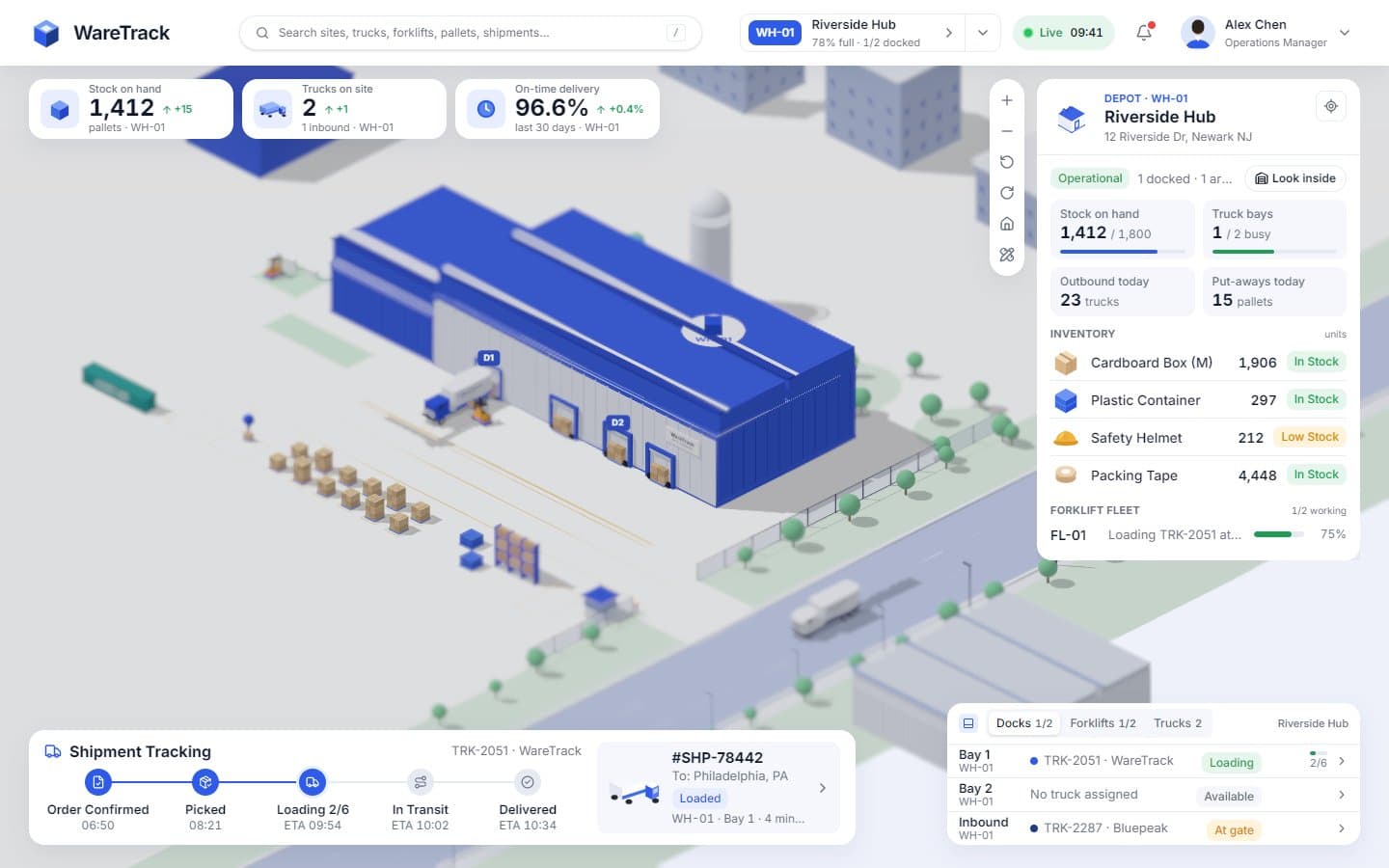
WareTrack is a warehouse operations dashboard that pairs an isometric 3D scene with a heads-up display of live operational data. It models five sites (WH-01 to WH-05) with docks, yards, trucks, forklifts and pallets, plus a network overview that summarises all sites at once.
Challenge

The Problem

The scene had to look like a polished product while running on machines without a GPU, keep simulated vehicles from colliding or teleporting, and still let users inspect and rearrange the yard without breaking those guarantees.
Solution

How We Solved It

I built a 10 Hz tick-based simulation engine with finite-state machines for trucks, forklifts and shipments and a per-site dispatcher, all feeding a single Zustand store shared by the HUD and the scene. Truck paths are derived from measured yard zones as straight segments and fixed-radius arcs, forklifts follow waypoint routes that yield to moving trucks, and unit tests enforce clearance rules and run 15 simulated minutes to catch collisions or teleports. Static geometry is instanced and vehicles are merged into one to three meshes, cutting one site from 1,120 to 143 draw calls, and an auto quality mode drops to a lite pipeline capped at 30 fps on software renderers or slow frame rates.
Flow

How It Works

  1. 1

    Open a site

    Each warehouse has its own route (/sites/WH-01 to WH-05). The page loads the site layout and renders an isometric React Three Fiber scene with building, dock doors, yard props, roads and trucks, framed by a live HUD.

  2. 2

    Live simulation

    A client-side engine ticks 10 times per second, advancing finite-state machines for trucks, forklifts and shipments. Trucks follow paths derived from the yard zones, and a dispatcher assigns the nearest idle forklift with enough battery to each loading or unloading bay.

  3. 3

    HUD updates from deltas

    Each tick produces a delta in the same shape as a future WebSocket message, so KPI cards, the shipment tracker and the Docks/Forklifts/Trucks tabs update from one store. Non-active sites keep lightweight background numbers for the site switcher.

  4. 4

    Select, search and deep link

    Clicking a truck, forklift, pallet or dock door, or picking it from global search, opens a matching detail panel and writes the selection to the URL (e.g. ?select=truck:TRK-2307), so any view can be shared.

  5. 5

    Look inside

    Clicking a building volume lifts its roof, trims the walls and shows an interior generated from the building spec: receiving, shipping and staging zones, rack rows with occupancy that follows stock, and floor statistics in the panel.

  6. 6

    Edit the layout

    The layout editor places, moves, rotates and removes yard objects with undo/redo and live clearance checks, and edits building size, docks and forklift staging. Changes are saved per site in localStorage, can be exported/imported as JSON, and restart the simulation on the new layout.

  7. 7

    Adaptive rendering

    A quality probe picks high mode (shadows, depth of field, MSAA) or lite mode (no post-processing, capped frame rate) based on the WebGL renderer and measured FPS, so the dashboard also runs on devices without a GPU.

Features

Key Capabilities

📦

Live 3D Scene

Isometric React Three Fiber scene with docks, yards, roads, fences, trees and a city backdrop per site.
🚚

Operations Simulation

FSM-driven trucks, forklifts and shipments with collision-free routing.
📈

Live HUD

KPI cards, shipment tracker, ops tabs for docks, trucks and forklifts, detail panels, notifications and global search.
🏭

Look-Inside Cutaway

Click a building to lift its roof and reveal racks, zones and stock-driven occupancy.
📐

Layout Editor

Place, move, rotate and delete yard objects with undo/redo, live clearance validation and JSON import/export.
⚙️

Adaptive Quality

High and lite render modes chosen automatically from GPU detection and measured FPS.
Gallery

Inside the Product

Site dashboardRiverside Hub (WH-01) in the isometric 3D scene with KPI cards, the site detail panel with inventory and forklift fleet, the shipment tracker and the docks list.
Look-inside cutawayThe roof lifts to reveal the generated interior: receiving, staging and shipping zones and rack rows filled according to stock, with floor area and rack positions in the panel.
Truck detailSelecting truck TRK-2307 highlights it in the scene and opens its panel with status, bay, pallet progress, customer and ETA.
Dock bay detailClicking a dock door shows the bay state (here Booked), the truck that reserved it and how many trucks it served today.
Forklift detailForklift FL-11 is assigned to load a truck; the panel shows its task, battery level, the pallet it carries, moves today and speed.
Layout editor: objectsThe object palette for placing pallet stacks, crates, racks, containers, yard slots, chargers, truck stalls and trees, with layout validation and JSON export/import.
Layout editor: site settingsEdits building width, height, roof type and wall color, dock positions and flow direction, and forklift staging; changes recompute truck paths, forklift routes and the interior plan.
Global searchSearch across all five sites for trucks, forklifts, pallets and shipments; choosing a result switches site and selects the object.
Cold-chain siteEastport Cold Chain (WH-03) with a raised dock platform, rooftop cooling units, silos and its own inventory and fleet data.
Distribution centerNorthgate DC (WH-02) with a glazed office wing, four busy dock bays and trucks from several carriers being loaded and unloaded.
Technical

Under the Hood

Rendering
Three.js via React Three Fiber, Drei and postprocessing (depth of field, fog, contact shadows), with InstancedMesh and merged vertex-coloured geometry for performance.
Simulation & State
Typed domain contracts with a snapshot/delta protocol, a tick-based engine, FSMs and a dispatcher feeding one Zustand live store.
Application
Next.js 16 App Router with one prerendered route per site, deep-linked selection state, site transitions and cmdk-powered search.
Quality
Vitest unit tests for the simulator, layout clearance and interiors, plus Playwright visual regression; shipped as a Docker image via Jenkins and Helm.
Results

Impact & Outcomes

Cut one site's scene from 1,120 to 143 draw calls through instancing and mesh merging

Usable on GPU-less machines thanks to an automatic lite render mode

Collision-free vehicle motion guarded by automated simulation tests

Reflection

What I Learned

3D dashboards work when the simulation is testable on its own and the renderer is just a view. Treating performance as a feature, with explicit quality tiers, made the scene usable on far more hardware than the design target.

Other Projects